A persona remembers the look of a person, animal, place or object from your photos so it looks the same in pictures and videos.
@Name or pick it with the Persona button.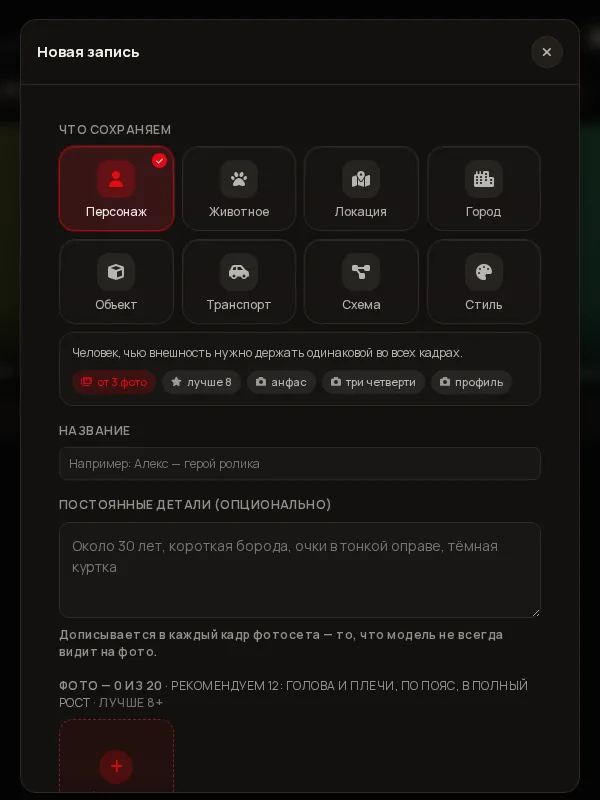
In the left menu open Library. The red Create button is at the top right (Invent without photos next to it is for an invented hero with no photos).
Character, Animal, Location, City, Object, Vehicle, Schematic or Style. Below the choice you see how many photos are needed: usually from 3 (city, vehicle and style from 4, schematic from 1), better 8 or more.
The name is what you will pick and write as @Name. In “Permanent details” (optional) add what the model may miss in photos: “about 30, short beard, thin-framed glasses”. It is appended to every frame of the photoset.
Press Add photo (20 photos in total). The Studio checks the set for free: sharpness, face size, angles — and shows “Set quality”: variety and how many photos are usable. Which photos work is covered in the next section.
Three options: Natural (lively skin with texture, as in the photos), Maximum detail (carries over every feature, including pimples and redness) and Clean skin (removes breakouts and redness; face, moles and age remain). You can change it later in “Shoot settings”.
Press Save persona. On first creation a “Rights to the face · 18+” window appears — details below. After confirming, the entry is created, an appearance card is built, and a contact sheet is assembled free from the same frames.
Tips the Studio shows under the upload (“How to shoot for an accurate persona”):
For objects, places and vehicles the logic is the same: different sides, light and scale. If an object was shot on an unsuitable background, enable “Appearance only — do not carry over background and light from the source photos”.
This is not a formality: without confirmation the persona is not created and no request is sent.
Before the first persona, adding photos or training, the Studio shows a “Rights to the face · 18+” window. You must tick the box:
Text: I am 18 or older. The photos show me, a person who gave me consent, or an AI-generated face that does not depict a real person.
In the create bar press Persona and pick an entry: it attaches to the following runs.
@NameName the hero in the text: “@Alex walks along the embankment, turns and smiles”. The Studio translates the reference into the chosen model’s language.
Open the entry in the Library: there you have Shoot photoset, “Frame by description”, “State variant” (e.g. wet, night) and “To studio”.
In chat you can attach photos and write “create a persona Alex”. The assistant checks the set for free and shows a card: name, kind, skin, the appearance-card price (≈⚡1) and a “I confirm” button for face rights — you press it yourself, the assistant cannot give consent. Then Create, “Make a test frame” or “Open in Studio”. More on the Chat and Studio together page.
1) Add photos from other angles and light (up to 20). 2) Check “Set quality”. 3) Build the contact sheet. 4) Prefer video models where the persona goes directly. 5) If photos are not enough — training. An “Another person” badge means the frame was not accepted as your hero: redo it.
No. The Studio rules forbid impersonating public figures and using someone else’s face without consent.
An account has a limit. When you reach it the Studio says so and suggests deleting an unused one.
