 GIBRID.AISchool
Big files: answers from any page and editing a document in place
Before, the assistant saw only the start of a long document and might not find an answer from the middle or the end. Now it can search the file: it finds the right places on any page and names the page numbers. The processing price is shown before it starts, and editing a Word file changes only the fragments you need and doesn't get more expensive as the document grows.
- Attach a PDF, Word or text file: “+” → Attach files (or My documents) and ask a question. If the file is large, the assistant searches it: it takes the 6 pieces closest to your question (about 900 characters each) and names the pages.
- The price is shown before processing: the assistant names it and asks whether you agree. Example: a file of about 180 pages costs roughly 0.15–0.2 G. The file is processed once; repeat questions about it are free.
- “Editing a document in place”: the assistant changes only the needed fragments in a Word file, leaves the rest alone, and the price doesn't grow with the file's size. The result is a new file “… (ред.).docx”; the original stays as it was.
- For search the file must be readable: a PDF with a text layer (scans without text can't be read), Word (.docx, .doc, .rtf, .odt), .txt and .md, no larger than 25 MB.
1Why search inside a document
The model reads an attached file in full while it is small. But from each file only the beginning goes into the request: roughly the first 50 thousand characters (about 25–30 pages), and for a PDF no more than 80 pages; per message, no more than 25 documents and about 250 thousand characters in total. If a contract has 200 pages, the model could miss the penalty clause on page 150 and honestly say the document was cut.
Search inside a document solves this: the file is “sliced” and indexed once, and for each question the assistant pulls out only the most fitting places. There's no need to read all 200 pages every time, so answers are faster and the price is lower.
2How to attach a big file
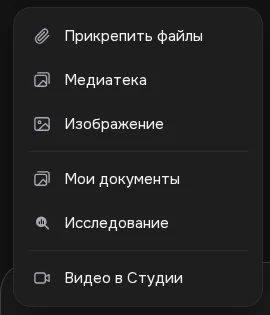
- Click “+” on the left of the input field
In the main chat at gibrid.ai/chat a menu opens.
- Choose the file source
Attach files is a file from your device. My documents is a file from your library (documents created and attached earlier).
- Ask a question about the document
For example: “Find in the contract what the penalty is for late payment” or “Which section of the report talks about 2025 revenue?”. Words like “in the document”, “in the file”, “in the contract”, “on which page” help the assistant understand that a file search is needed.
On the website you can attach a document of up to 100 MB, but for search the file must be no larger than 25 MB. More about attachments on the page about documents in chat.
3How the search inside a document works
- Slicing. The file's text is divided into pieces of no more than 900 characters along paragraph boundaries. For a PDF, the page number of each piece is remembered.
- The index. For each piece a numeric “fingerprint” of its meaning is computed (an embedding). The same service that powers the Gibrid agents' knowledge base does this. The index is saved.
- The search. Your question is also turned into a “fingerprint”, and the 6 pieces closest to it are pulled from the index.
- The answer. The assistant answers from these pieces and names the page (“p. N”). Word files have no detectable page numbers, so a page reference is available for PDFs.
No more than 600 pieces go into the index. That is roughly 500 thousand characters, about 250–300 pages of ordinary text; a longer “tail” of the file isn't searched. If the file is small (up to 50 thousand characters), the assistant already sees it in full, so no search is needed and nothing is charged.
4The price is shown before processing
- The assistant names the price
On the first search in a new file, processing doesn't start by itself. The assistant writes that the file needs to be indexed once and names the amount in G.
- You reply “yes”
If you agree, write “yes” or “go ahead”. If not, just don't reply or decline: nothing is charged.
- The file is processed and the answer arrives
After your consent the indexing runs, the amount is charged, and the assistant answers from the pieces it found.
- Next questions are free
The index is already built, so repeat questions about this file cost nothing.
| File | Processing price |
|---|---|
| A text file of 322 thousand characters (about 180 pages), a test example | 0.147 G (≈ 0.15 G) |
| ~180 pages, a rough guide | about 0.2 G |
| A file under 50 thousand characters | not needed: the assistant sees it in full |
| Processing cheaper than 0.05 G | the assistant doesn't ask again |
| Repeat questions about an already indexed file | free |
5Editing a document in place
Before, to fix a couple of paragraphs in a Word file, the assistant rewrote the whole document, and the price grew with its size. Now it can change things surgically: it gives a list of replacements, and the rest stays as it was.
- Attach a Word file
“+” → Attach files (or My documents). Editing works with .docx, .doc, .rtf and .odt.
- Say what to change
For example: “Replace ‘Daisy LLC’ with ‘Tulip LLC’ everywhere in the contract” or “Rewrite the ‘Payment terms’ section: payment within 10 days”. You can give several edits at once.
- Download the result
A new file “name (ред.).docx” appears. The original file is not changed.
- Two kinds of edits. Replacing an exact fragment (“find → replace”) and new text for a whole section under a heading. Up to 30 edits at a time.
- The rest is untouched. The source's styles, fonts, page margins and headers/footers are kept.
- If a fragment isn't found, nothing changes: the assistant first reads the document's text and repeats the edit with an exact quote.
- Price. The model's reply is short (just the list of replacements), so the price doesn't grow with the file's size. To find the right place the assistant may first need to read the document (one read is up to 60 thousand characters).
6Limitations
- Only this chat's attachments. The assistant searches files you attached in this chat or picked from “My documents”. Arbitrary links on the internet are not read this way.
- Formats. Search works with PDF, Word (.docx, .doc, .rtf, .odt), .txt and .md. Excel spreadsheets, presentations, audio and video don't go into the index.
- Scans. The assistant can't read a PDF without a text layer (photos of pages): there is no text recognition from images here.
- Size. For search the file is no more than 25 MB and no more than 600 pieces (about 250–300 pages).
- One file per question. If there are several documents in the chat, name the one you need.
- Signed-in only. Attachments are not available to guests.
?FAQ
How much does searching a big PDF cost?
Processing the file is paid once: for a file of about 180 pages, roughly 0.15–0.2 G. The assistant names the price before starting and waits for your “yes”. Repeat questions about the same file are free, and the reply itself is paid for like an ordinary chat message.
Why does the assistant ask for confirmation before searching?
So that you see the price in advance. Until you agree, processing doesn't start and nothing is charged. It doesn't ask again for very cheap processing (under 0.05 G).
What does “6 closest pieces” mean?
The file is cut into pieces of about 900 characters. For each question the assistant takes the 6 pieces closest in meaning to the question and answers from them, naming the page for a PDF.
Can I search a scanned PDF?
No, if it has no text layer: the assistant can't read such a file, because there is no text recognition from images. Save the document with text or send the needed pages as text.
What is the maximum file size?
On the website you can attach a document of up to 100 MB, and search inside a file up to 25 MB. No more than 600 pieces are indexed (about 250–300 pages).
How does in-place editing differ from ordinary editing?
The assistant doesn't rewrite the whole document but gives a list of replacements (up to 30), so the rest of the text and formatting don't change and the price doesn't depend on the file's size. The result is saved to a new file “… (ред.).docx”. It works only for Word documents.
What if the assistant can't find the fragment to replace?
Nothing changes. The assistant reads the document and repeats the edit with an exact quote from it.
Related
Documents: ask for a file, download a reply, find it in the library
Gibrid chat can deliver not only text but also ready-made files: write what you need and get Word, PDF or…
Read more →Auto mode: a fast model for simple things, a strong one for hard ones
A new chat on gibrid.ai/chat starts in Auto: for every message, Gibrid picks the model itself. A greeting, a…
Read more →Research in Gibrid chat: a report from ten sources
When you need not a quick “google it” but a market overview, a comparison of services or an analysis of a…
Read more →Projects: chats, instructions and files for one job
A project brings together chats, tasks and files for one job. The Gibrid assistant takes its instructions and…
Read more →Billing, plans and balance: how it works
Gibrid has one balance for everything: chat, images, video, voice and agents. It is spent in ⚡ G-tokens, and…
Read more →