 GIBRID.AISchool
Auto mode: a fast model for simple things, a strong one for hard ones
A new chat on gibrid.ai/chat starts in Auto: for every message, Gibrid picks the model itself. A greeting, a translation or a short question goes to a fast, cheap model; a file, code or a document goes to a strong one. The line under the reply says honestly which model answered, and the price shows next to the send button before you send.
- In the web chat gibrid.ai/chat, Auto is on by default if you have never picked a model yourself. For each message the server takes a fast model (Gemini 3.8 Flash) or a strong one (Claude Sonnet 5.5).
- Under the reply there is a line like “Auto · fast model · Gemini 3.8 Flash”, so you can see which model answered and why.
- To pick your own model: the mode button under the input field → the Model row → any model in the list. Auto is a separate row at the top of that list.
- Next to the send button there is a “≈ N G” chip with the price of the next message; for Auto it is a range such as “≈ 0.5–1.6 G”. At 10 G and above the chip gets brighter and suggests a fast model or a new chat.
- If a reply is cut off by length, click Continue. The start of a very long conversation is condensed into a short summary so the assistant doesn't forget what you talked about.
1How Auto chooses a model
The decision is made on the server from the words of your message and its attachments, without a separate AI call. So Auto adds nothing to the price and doesn't slow the reply down.
| Tier | Which model it takes (in order) | When |
|---|---|---|
| Fast | Gemini 3.8 Flash; if unavailable, GPT-6 Luna, then Claude Haiku 5.5 | everyday messages: a greeting, a short question, a translation, ideas, a congratulation, fresh news with a web search |
| Strong | Claude Sonnet 5.5, then Claude Sonnet 5, Claude Sonnet 4.6, Claude Sonnet 4 | there is a complexity signal (see the list below) |
The strong model is switched on by these signals:
- a file or an image is attached to the message;
- the topic is video, documents and tables, a storyboard, creating a persona, souls and agents, mailings, your account, payment or support, or you explicitly ask to draw a picture (the assistant recognizes the topic by keywords);
- you ask for a schedule or a repeat (“remind me”, “every day…”);
- the text has code or programming words (function, error, Python, SQL and similar);
- you ask it to think or compare (“think”, “compare”, “analyze”, “pros and cons”);
- a long conversation (more than about 24,000 characters of history) or a very long message (more than 6,000 characters);
- Research mode is on (a report from many sources).
Words about pictures and schedules raise the model only as an explicit request. For example, “Translate: the meeting is tomorrow at 10 am” stays on the fast model: the word “tomorrow” alone is not a signal.
Once a conversation has become “strong”, it stays strong for 6 hours: without a new signal the model is not raised, and in the middle of a hard conversation it is not quietly downgraded. If a model is locked by your plan, Auto takes the next one in its list.
2The line under a reply: who answered
Under every reply in Auto mode there is a small grey line. For an ordinary message it reads “Auto · fast model · Gemini 3.8 Flash”. For a hard one: “Auto · strong model (code) · Claude Sonnet 5.5”. The reason is in brackets: “file”, “tools”, “code”, “hard task”, “long text” or “continuing the thread”.
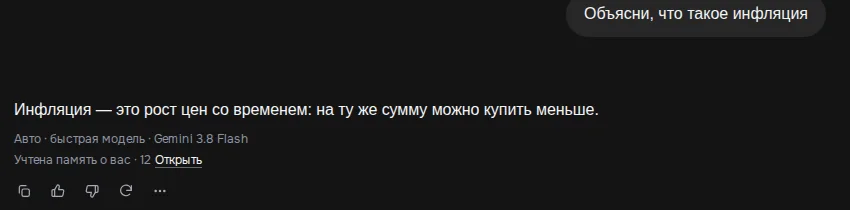
Hover over the line and a hint appears: “Auto picked a model for this message. To turn it off, choose a model in the list.” The Continue button (when a reply was cut off) continues the reply with the same model that started it.
3How to pick a specific model or go back to Auto
- Open the mode menu
In a new chat, click the button under the input field on the right. It says “Auto”, “Fast” or “Thinking”: that is the thinking-depth mode, not the choice of model.
- Click the “Model” row
A list of models by developer opens. At the very top there is a separate Auto row with the caption “Picks for you: a fast model for everyday questions, a strong one for files, tools and hard tasks” and a price range.
- Choose Auto or any model
The choice is remembered: for this chat and for new chats. With a model you chose by hand, Auto stays out of the way and the “Auto · …” line doesn't appear under replies.
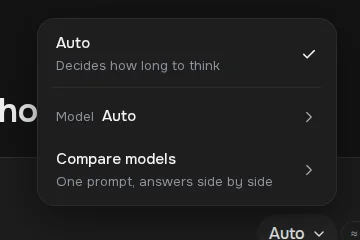
If you picked a model by hand earlier, it stays selected: Auto is the default only where no choice was made yet. Auto works in the web version; the Gibrid mobile apps still answer with their previous default model. To compare several models on one question, see the page about comparing models.
4What it costs: the “≈ N G” chip by the send button
To the left of the send button in the input box there is a small chip with the price of the next message, for example “≈ 0.5–1.6 G”. G is the same as the ⚡ token (1 ⚡ ≈ $0.025). The price is calculated in advance by the same formula that is later used to charge your balance:
- the assistant's built-in part of the request (its instructions and tool descriptions): about 12,000 tokens;
- plus the history of this chat (about 1 token per 3.2 characters) and attachments (1,500 tokens per attachment);
- plus a typical reply of this model; the price comes from the model's price table with your plan's markup;
- a per-model correction: once an hour the server compares the estimate with actual charges over 14 days.

For Auto the chip shows a range from the fast to the strong model. The exact amount is only known after the reply: it depends on which tier Auto picks and on the length of the reply. For a model you chose by hand the chip shows a single number. The same price (“≈ N G in this chat”) is shown on every row of the model list, so you can see an expensive model before choosing it.
| What you see | What it means |
|---|---|
| ≈ 0.5–1.6 G | the Auto range in an empty chat: the lower number is the fast model, the upper one is the strong model. In your chat the numbers depend on your plan (the lower the markup, the smaller the amount) and on the conversation length |
| A brighter chip and the hint “Messages in this chat are expensive” | the estimate reached 10 G or more. This is usually a long history. A fast model or a new chat will be cheaper |
| No chip | the price for this model hasn't been calculated yet (for example, no connection to the server) |
5A reply was cut off: the “Continue” button
A reply used to be cut off mid-word because of a length ceiling. Now the ceiling comes from the model's capabilities but is no more than 16,000 tokens (up to 32,000 with deep thinking). If a reply still hits the ceiling, a line appears under it: “The reply was cut off by length · Continue”.
- Click “Continue”
The assistant finishes the reply from where it stopped, without repeating itself and without a greeting.
- Keep reading in the same bubble
The continuation is added to the same reply. The service phrase “continue” does not go into the chat history.
The same model that wrote the beginning writes the continuation. The charge is fair: only the continuation's tokens are charged, and in the “cost of the reply” they add up with the first part. The button appears only on the last reply of the conversation.
6A long conversation: the start is condensed into a summary
The model doesn't see the whole conversation, only the latest messages that fit its window (the web chat sends up to 30 messages). Before, everything earlier simply disappeared, and the assistant answered “as I said at the start…” off the mark. Now whatever didn't fit is condensed by the inexpensive Gemini Flash model into a short summary (no more than 1,200 characters) and passed to the assistant along with your question.
Under the reply a line appears: “The start of the conversation (24 msg.) was condensed into a summary · Show”. Click Show to read the summary itself and Hide to collapse it.
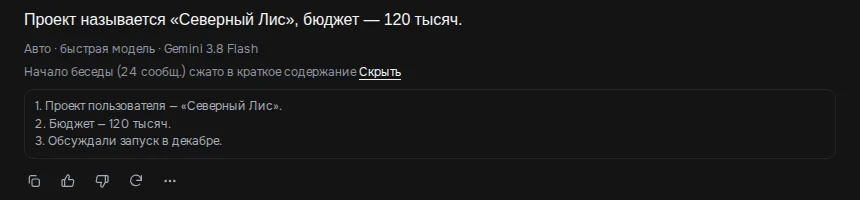
- the summary is saved and is recalculated not on every message but when about 12 new “dropped” messages have piled up;
- the cost of condensing is included in the cost of your reply; there is no separate line in your balance;
- in a temporary chat (covered on its own page) no condensing is done, because the history is not saved;
- there is no “new chat with a summary” offer: when a message gets expensive (10 G and above), the price chip itself suggests starting a new chat.
7Feature hints under a reply
Sometimes a single short hint appears under the last reply. Each kind is shown no more than once a day, and you can close it with the cross:
| When it appears | What it suggests | What the button does |
|---|---|---|
| You wrote “every day…”, “every morning…”, “daily” or “weekly” (the Russian and English wordings both count) | “This can repeat on a schedule” | Repeat: asks the assistant to turn the request into a scheduled task |
| You asked the same question for the third time | “This is the third time you ask this” | Save to My prompts: saves the text into My prompts |
| A big reply (from 1,500 characters) in a saved chat | “A long answer — you can share a link to it” | Share: creates a public link to the chat and copies it |
In a temporary chat the hints are not shown. More about public links on the page about sharing a chat.
8What Auto does not do
- It doesn't read minds. The choice goes by words and attachments. If a hard question is written very briefly and without “signal” words, it can go to the fast model. Then clarify the task or pick a strong model by hand.
- There is no “always strong” button. If you want the same level every time, choose a specific model in the list.
- It doesn't work in the mobile apps. For now Auto is in the web version gibrid.ai/chat.
- It doesn't guarantee an exact price. The chip is an estimate; the real amount is visible after the reply: in the “⋯” (More) menu under the reply there is a “Cost ≈ N G” line.
?FAQ
What is Auto in Gibrid chat, and is it on by default?
It is a mode where the model is chosen for each message: a fast, cheap one for everyday questions, a strong one for files, code, documents and hard tasks. In the web chat gibrid.ai/chat it is on by default if you haven't chosen a model by hand before. The line under the reply says which model answered.
How do I turn Auto off?
Open the mode menu under the input field, click “Model” and choose any specific model instead of the “Auto” row. The choice is remembered. You can come back the same way: the “Auto” row is at the top of the list.
Why does a strong model sometimes answer a simple question?
A signal fired: a file or image attached, words about code, a document, a schedule, “think/compare”, a long history, or the conversation had already become “strong” (it stays that way for 6 hours). The reason is in brackets in the line, for example “strong model (file)”.
How much does a message in Auto mode cost?
A range is visible in advance in the chip by the send button, for example “≈ 0.5–1.6 G”. In measurements on 12 typical messages, quick replies cost 0.19–0.45 G, while code and documents cost 2–2.6 G. The exact amount depends on your plan, the conversation length and the reply.
What does “The reply was cut off by length” mean?
The model reached the reply length ceiling (up to 16,000 tokens, up to 32,000 with deep thinking). Click “Continue”: the assistant finishes the reply in the same bubble with the same model, and you pay only for the continuation.
The assistant forgot the start of a long conversation. What should I do?
Usually nothing: the start is condensed into a summary and the assistant takes it into account (a line “The start of the conversation … was condensed into a summary” appears under the reply). If an exact quote matters, repeat it in the message or open a new chat.
Is Auto available in the iPhone and Android apps?
Not yet: Auto works in the web version. The apps answer with their default model, as before.
Related
Your first conversation in Gibrid chat
Chat is Gibrid's main screen: one input field, with models like GPT, Claude and Gemini behind it. Here is how…
Read more →Compare models: one question, answers side by side
Not sure which model will handle your task better? The “Compare models” screen sends one request to two or…
Read more →Research in Gibrid chat: a report from ten sources
When you need not a quick “google it” but a market overview, a comparison of services or an analysis of a…
Read more →Big files: answers from any page and editing a document in place
Before, the assistant saw only the start of a long document and might not find an answer from the middle or…
Read more →Billing, plans and balance: how it works
Gibrid has one balance for everything: chat, images, video, voice and agents. It is spent in ⚡ G-tokens, and…
Read more →