 GIBRID.AISchool
Memory and a soul's “lessons”: what the AI remembers about you
Gibrid can remember stable facts about you across different chats (name, profession, preferences) to answer more accurately. Everything remembered can be viewed, corrected and deleted. Each soul also has its own memory with “lessons”.
- The shared memory about you is in settings, the “Memory” tab. It can be turned off, added to and cleared; the “Do not remember” switch keeps the memory but stops chats from writing to it.
- Memory is read and filled in every chat: in the main chat on request “remember…” (the line “Remembered · Open” appears under the answer) and by background analysis, in “Models” chats and chats with souls by background analysis.
- Under the first answer of a chat there can be a line “Your memory was used · N · Open”; a “Temporary chat” neither reads nor updates memory.
- Each of your own souls has a separate memory: “Facts”, “Episodes” and “Lessons”, the rules a soul learns on its own.
- Any entry can be corrected or erased; erased items cannot be restored. Gibrid does not remember health, money, passwords, documents, religion or politics.
1Two kinds of memory
- Memory about you is one shared list of facts for all chats: “my name is…”, “I work as…”, “I like short answers”. It is stored in your account.
- Soul memory is what a specific soul (an agent with a character) remembered: facts about the person it talks to, summaries of conversations and learned rules. Other souls can't see it.
2Memory about you: settings
- Open settings
Click your name or avatar at the bottom of the side panel and choose Settings.
- Go to the “Memory” tab
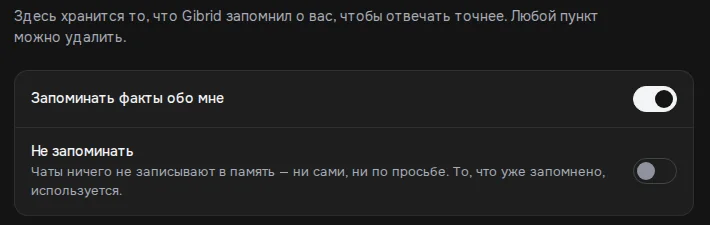
The tabs include: Profile, Security, Preferences, Memory, Sessions. At the top is the explanation: “This is where Gibrid keeps what it remembered about you in order to answer more accurately. Any item can be deleted”.
- Choose what to do with memory
The “Remember facts about me” switch is the master switch: when it is off, memory is neither used in answers nor updated. Below it is the “Do not remember” switch: it works only while the first switch is on, and its explanation says: “Chats write nothing to memory — neither on their own nor on request. What is already saved is still used.” It is off by default.
- Check the “Facts” list
Next to each item there is a Delete button. If the list is empty, you will see “Nothing remembered yet”.
You can add a fact yourself in the “Add a fact about yourself” field with the Add button. To move memory from another service, open the “Import memory” block → Import from text: paste text about yourself or what another chat “remembers” about you, click Extract facts, and Gibrid picks out the facts and adds them to the existing ones (“Memory updated” appears). The same place is opened by the link “Import memory from ChatGPT or Claude” in the new-user window (first entry).
To erase everything, find the Clear memory row at the bottom of the tab and click Delete. A window “Clear all memory?” opens with the Cancel and Delete buttons; while the fact list is empty, the button is disabled. The memory of individual souls does not change.
The total memory size is limited (about 16 thousand characters; up to 120 items are stored automatically, and older ones make room for newer ones).
3What is remembered
Memory is filled in two ways. The first is your request: “Remember that I am vegan” in the main chat (the assistant saves the fact and says “remembered” only after a successful save); “forget…” erases an entry. The second is background analysis: after a reply, an inexpensive service model looks at the latest exchange and decides whether you revealed something stable about yourself: your name and how to address you, profession, city, language, projects and goals, tools, tastes and preferences (including food), the preferred style of answers.
- Background analysis runs only when you speak about yourself (“I”, “me”, “my”) and the message is at least 20 characters long. It runs no more than once every 3 minutes and writes no more than 5 times a day. These limits do not apply to the request “remember…”: to make it work for sure, start the message with the word “Remember” or “Forget”.
- Not recorded: the content of a one-off task, facts about the world, the assistant's words and guesses. If a fact changes, the old line is replaced with the new one.
- Never recorded (neither on its own nor on request): health and illness, medicines, money and income, debts, card and account numbers, passwords and keys, documents, exact address, religion, politics, intimate life.
- The pop-up “Memory updated” is gone: background records are visible only in Settings → Memory, and an explicit “remember” request leaves a quiet line “Remembered · Open” under the answer.
Memory is read in every chat: the assistant takes it into account in its answers without reciting the list. Under the first answer of a chat there can be a line “Your memory was used · N · Open” (N is how many facts were used; Open leads to Settings → Memory). In a temporary chat memory is neither read nor updated.
4Soul memory: facts, episodes, lessons
Only the owner can manage a soul's memory. To get in: in a chat with the soul, the “+” menu → Memory; in the soul editor, the “Memory” tab. The window title is “Memory: soul name”. The “Memory sections” tabs:
- Facts. Short entries with a type: “Preference”, “Biography”, “Context”, “Other”. Click an entry to correct it (Enter to save, Esc to cancel), or Add fact manually (up to 500 characters).
- Episodes. Brief summaries of past conversations; they appear after several conversations with the soul. Click an episode to edit its text.
- Lessons. Rules the soul uses in its answers (“speak shorter”, “don't joke about work”). They are divided into “Active”, “Under review” and “Withdrawn”.
How lessons work: after conversations the soul proposes lessons itself, and they go to “Under review”. Until you accept a lesson, the soul doesn't use it. The Accept / Accept all buttons make a lesson active (the soul uses it), Withdraw lesson removes it from answers, and Restore returns it to review or to use. You can create a lesson yourself: Add lesson with an optional label (“Label, for example “tone””). Any lesson can be withdrawn in the “Active” section.
The “Search entries” field is for searching, and the list loads more with the “Show more” button. To forget everything, click Erase memory…: you can erase “Only my entries” or “The soul's entire memory” (for that you need to enter the soul's name). Erased entries can't be restored.
?FAQ
Can I forbid remembering?
Yes, in three ways. In Settings → Memory turn off “Remember facts about me”: the assistant stops both using and updating memory. Turn on “Do not remember”: the memory stays and is used, but chats stop writing to it (neither on their own nor on request). Or open a “Temporary chat”, which does not touch memory at all.
Can other people see my memory?
No. Shared memory is stored in your account and inserted into your chats. A soul's memory is available only to the soul's owner.
What happens if I click “Delete” in the “Clear memory” row?
A window “Clear all memory?” appears. If you confirm, all facts about you are deleted and cannot be restored. The memory of individual souls does not change; it is erased separately.
Why isn't the soul using a new lesson?
Most likely it is still “Under review”: the soul applies only accepted (“Active”) lessons. Click Accept.
Where did the “Memory updated” notification go?
It was removed: it popped up too often. Now background records are visible only in Settings → Memory, and when you yourself asked “remember…”, a quiet line “Remembered · Open” appears under the answer.
Related
Your first conversation in Gibrid chat
Chat is Gibrid's main screen: one input field, with models like GPT, Claude and Gemini behind it. Here is how…
Read more →Temporary chat and memory: what is remembered and what isn't
Sometimes you want to ask something personal so that it doesn't end up in your history or in the assistant's…
Read more →Projects: chats, instructions and files for one job
A project brings together chats, tasks and files for one job. The Gibrid assistant takes its instructions and…
Read more →Chat tools: files, search, voice and scheduled tasks
The Gibrid assistant doesn't just answer in text: it reads your files, looks up fresh data on the web…
Read more →