 GIBRID.AISchool
Ad from a link: from a product page to five shots
A small business does not always have material for ads. If your product has a page in an online shop, Studio reads it, finds the name, price, benefits and photos, suggests a script of five ad shots and makes them as a chain. The main condition is that you confirm you have the rights to the photo.
- The Ad from link button sits above the feed of works and appears after your first finished work. Paste a link to a product page and press Review.
- Studio shows the name, price, 3–5 benefits, the photos it found and a script of 5 shots. Choose a photo and tick “I have the rights to this photo…” — without it you cannot start.
- 5 shots cost 10 tokens (5 × 2); reading the page is free.
- Public pages with ordinary markup work. Pages built entirely by a script in the browser are not read.
1How to open it and go through the steps
The button is next to Select and Chains above the “My generations” feed.

- Open the window
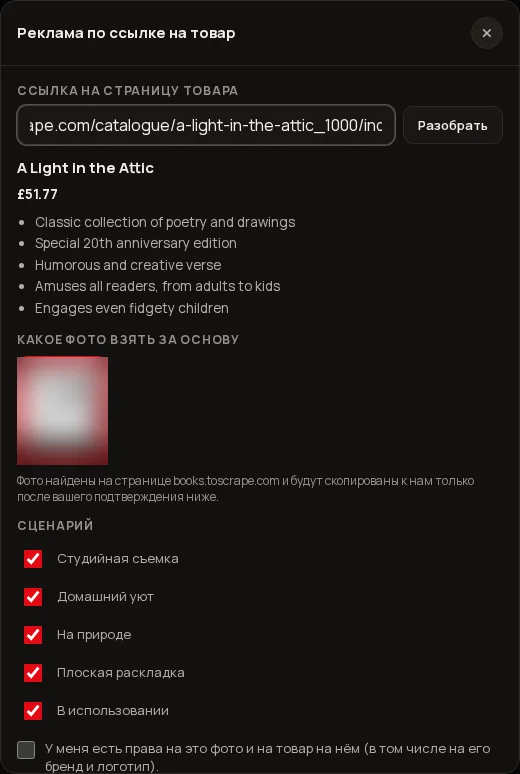
Press Ad from link. The “Ad from a product link” window opens.
- Paste the link
In the “Product page link” field paste the address of the product page (https://…) and press Review or the Enter key. The window waits for the answer for up to 90 seconds; while reading goes on, it does not close with Esc or a click outside.
- Check what was found
Under the field you will see the name, the price and a list of benefits (up to five, in the language of the page). An AI does the reading, so compare the name, price and benefits with the page.
- Choose a photo
The “Which photo to use as the base” block shows the photos found on the page (up to 12), with the source site under each. Click the one that will be the base of the ad.
- Look at the script
The “Script” block has 5 scenes, each with a tick. You can untick the ones you don’t need: the price is counted for the rest. The scene names are suggested by the model and differ from product to product (studio, interior, nature, flat lay, the product in use).
- Tick the rights box
“I have the rights to this photo and to the product in it (including its brand and logo)”. Until it is ticked, the start button is inactive.
- Press “Run”
The button shows the price, for example “Run · 10 tokens”. First the photo is copied to us, then the shots are made one by one.
From here it is like chains: the steps go one by one, each with the status “waiting”, “running…”, “done” or “failed — refunded”. While the steps run, there is a Stop button at the bottom: the remaining steps will not start and will not be charged. When the shots are ready they are already in your feed, and Animate the chosen one appears in the window — a 6-second clip from the chosen shot, as in “Animate a photo”. First Studio copies the chosen photo (at this stage a strip “Ad from link: preparing the photo…” stands above the feed), then the steps run. If you close the window while it works, Studio asks “Stop the chain?”: Stop (the current step finishes, the rest are not charged) or Continue in the background (selected by default). In the background a strip “Ad from link · step N of M” with “Open” and “Stop” buttons stands above the feed. Only one chain runs at a time. The ad has no “Try again” button: to start anew, close the window with Close and open it again.
2Which pages are read
- Work: public product pages that open without logging in, at http or https addresses, with ordinary markup. Studio reads the name and price from the product markup (JSON-LD), meta tags (og tags) and headings, and the photos from meta tags and ordinary images on the page. Small images and icons (logos, icons, ratings, buttons) are filtered out.
- Do not work: pages built entirely by a script in the browser — the page itself holds no markup and no images. Studio will honestly reply: “No product photos were found on the page. Upload a photo yourself — the “Product → 5 creatives” chain is already in Studio”. Pages that are too large (over 1.5 MB), addresses that are not public and, as a rule, pages behind a login will not work either.
We cannot promise specific shops in advance: the reading is general, not tailored to one shop. If a page opens without logging in and has ordinary product images, your chances are good.
3Photo rights and safety
- The rights box is required. Without it neither the button nor the server works (it replies “Confirm that you have the rights to this photo and product”). Tick it only if the photo is yours or you may use it, including the brand and logo on the product.
- A log of confirmations. Each confirmation is recorded: who gave it, which site the photo came from and when.
- The photo is copied only after confirmation. Until you press “Run”, the window shows only previews from the shop’s site; the photo reaches us after the tick.
- Metadata is not carried over. The photo is re-encoded as an ordinary JPEG (long side at most 2048 pixels), so shooting data and location tags from the file are not kept. Copying needs a photo of at least 256 × 256 pixels in JPEG, PNG or WEBP and up to 8 MB.
- Nothing foreign is drawn in. For every shot Studio itself adds a ban: do not add brand names, logos, watermarks or text that are not on the product itself. The server adds it, not the model. But whatever is already on the photo stays, so check the result.
- Safe download. The page and the photo are downloaded only from ordinary addresses (ports 80, 443, 8080, 8443). Internal and service addresses are rejected; the address is checked after every redirect. The page text is data for the AI, not instructions, and pictures are taken only from the analysis of the page itself.
4Limits and sizes
| What | Limit |
|---|---|
| Reading a page | 15 per hour and 60 per day |
| Copying a photo (on start) | 40 per hour and 120 per day |
| Page size | up to 1.5 MB |
| Photo size | up to 8 MB, at least 256 × 256 pixels |
| Photos in the choice list | up to 12 |
| Scenes in the script | 5 |
If you go over a limit you will see “Too many reads in a row — try a bit later” or “Too many uploads in a row — try a bit later”: wait and repeat.
5How much it costs
| What | Price |
|---|---|
| Reading the page and choosing a photo | free |
| One script shot | 2 tokens |
| All 5 shots | 10 tokens (5 × 2) |
| If you unticked some scenes | 2 tokens for each remaining one |
| A clip from the chosen shot (“Animate the chosen one”) | about 8 tokens, started separately |
6If something goes wrong
| What the window shows | What to do |
|---|---|
| “A link to a product page is needed (http or https)” | Paste the full address starting with https:// |
| “Couldn’t open the page — check the link” | Open the link yourself in a browser without logging in; the page must be public |
| “The page did not open in time” or “The page is too large” | Try another product page |
| “This link is not a shop page” | The link leads to something other than an ordinary page (for example, a file) |
| “No product photos were found on the page…” | The page is built by a script or has no images: upload the photo yourself through the “Product → 5 creatives” chain |
| “Couldn’t read the page — try again” / “Couldn’t build a script…” | Press “Review” again |
| “Couldn’t download the photo — choose another” / “This photo doesn’t fit” | Choose another photo from the list: this one is too small or is not a picture |
?FAQ
Which shops and marketplaces work?
We do not promise specific sites: the reading is general. Any public product page with ordinary markup works, that is, with the name, price and pictures in the page itself. Pages built entirely by a script are not read.
Why does it say no photos were found?
Either the page is built by a script, or it has no suitable pictures, or they are too small and look like icons. Upload the photo yourself through the “Product → 5 creatives” chain.
What does the photo rights box mean?
You confirm that the photo is yours or you have the right to use it, including the brand and logo on the product. Without it you cannot start, and the confirmation itself is written to a log.
How much does an ad from a link cost?
Reading is free, 5 shots cost 10 tokens (2 tokens a shot). A clip from the chosen shot is started separately, for about 8 tokens.
Is the photo’s metadata kept?
No. When copied, the photo is re-encoded as an ordinary JPEG, so shooting data is not carried over.
How many links can I read?
Up to 15 per hour and 60 per day. Copying a photo on start is allowed up to 40 times an hour and 120 a day.
Can Studio put someone else’s logo on the shots?
For every shot a ban is added on drawing in names, logos and text that are not on the product. But whatever is on your photo stays. Always check the result.
Related
Chains: one photo, several finished shots at once
A chain is a ready-made sequence of steps. You upload one photo and press one button, and Studio makes the…
Read more →Animate a photo: from a picture to a clip in one step
Want a still photo to breathe, move its hair, or be circled by a camera, without learning about models and…
Read more →Finishing a clip: format, brand bar, editing and zip — free
The clip is ready, but you need a vertical version for Reels, a bar with your phone number, or a cut of…
Read more →Share a link to your work: you publish, and you can hide it any time
Need to show an image or clip to a friend, a client or in a messenger? Every finished work of yours has a…
Read more →Billing, plans and balance: how it works
Gibrid has one balance for everything: chat, images, video, voice and agents. It is spent in ⚡ G-tokens, and…
Read more →