 GIBRID.AISchool
Translate a clip: the same clip in another language
Do you have a clip with speech and need a version in another language? “Translate the clip” recognises the speech, translates it, voices it with the voice you choose and swaps the sound in the clip. You get a new entry in the feed; if you want, the translated subtitles are burned into the picture, and an .srt file can be downloaded. The price is shown before you start.
- Open a finished clip → in the “Actions” bar press Translate the clip: choose a language out of 9, a voice and, if needed, Burn the translated subtitles into the video.
- The price depends on the clip length and is shown before you start: a 7-second clip costs 2 tokens, or 3 with burned-in subtitles. If there is no speech or something fails, the payment is refunded.
- Only your own Studio clip no longer than 2 minutes can be translated. Lips are not re-synced and background music is not kept — the sound is replaced entirely.
- The voice comes from the catalogue of paid voices or is your own clone. Other people’s voices are not in the list.
1How to translate a clip
- Open the clip
In Studio open a finished clip full screen — in the “My generations” feed or in a project.
- Press “Translate the clip”
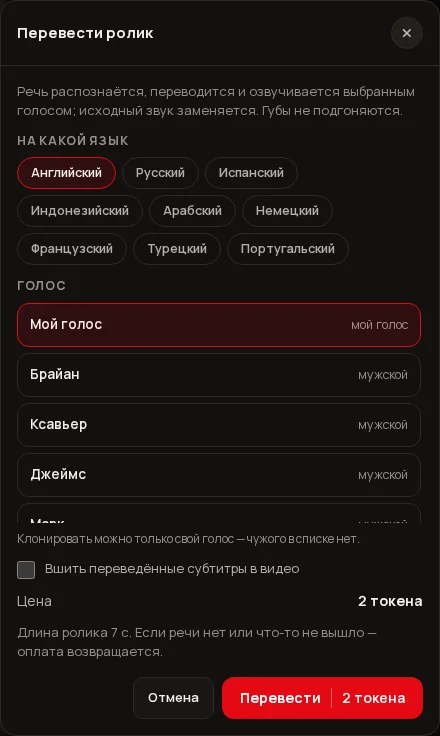
In the Actions bar at the top of the viewer. The “Translate the clip” window opens.
- Choose the language
The “Into which language” block has 9 options: English, Russian, Spanish, Indonesian, Arabic, German, French, Turkish, Portuguese. You do not choose the language of the original speech — it is detected automatically.
- Choose the voice
In the “Voice” block click the row you want: your clones first (marked “my voice”), then the catalogue voices. More in the voice section below.
- Decide about subtitles
The Burn the translated subtitles into the video box puts the translation on the picture in large white text with an outline. Without the box the sound is new and the picture stays as it was.
- Check the price and press “Translate”
The “Price” line shows the number of tokens, and under it is “Clip length N s. If there is no speech or something fails, the payment is refunded”. The button shows the same number: “Translate · N tokens”. If you tick “Burn the translated subtitles into the video”, the price rises a little (on short clips this can add 1 token to the number), and a note appears under the price: “Burned-in subtitles are a separate part of the price: if they can’t be burned in, it isn’t charged”.
While the translation runs, the button says “Translating…”, and the window does not close with Esc or a click outside. When it is done, the window says “Done. The clip with new voice-over was added to your feed” and offers the buttons Open the clip and .srt. The original clip stays as it was, and the new one appears in the feed as a separate entry labelled “Translation · language” (shown in Russian as “Перевод · язык”).
2What happens inside
- Speech recognition. Everything that is spoken in the clip is found; the language is detected automatically.
- Translation. All lines are translated in one request, the number of lines is kept and the answer is checked. The translation is in a lively spoken style, and each line is kept close to the original length.
- Voice-over. Each phrase is voiced with the chosen voice. One voice for the whole clip: if several people speak in it, they will all speak with the same voice.
- Assembly. The phrases are placed at their time slots. If the voice-over is longer than the original phrase, it is sped up, but by no more than 1.4 times. The picture of the clip is not re-encoded and loses no quality; only the sound changes.
- Subtitles (optional). The translated text is burned into the picture.
3Voice: the catalogue or your own clone
- Catalogue voices. These are paid ElevenLabs voices — up to 12 in the list: male (for example “Брайан” — Brian, “Ксавьер” — Xavier, “Джеймс” — James) and female (for example “Белла” — Bella, “Аделина” — Adelina, “Ева” — Eva); the names are shown in Cyrillic in every interface language. Next to each it says male or female. The translation price does not depend on which one you choose.
- My voice. If you have a ready voice clone, it stands first in the list marked “my voice” and is selected by default. You can clone only your own voice — how to make a clone is on the voice cloning page.
- You cannot pick someone else’s clone. Other people’s voices are not in the list, and the server rejects a clone that is not yours or does not exist.
A hint in the window reminds you: “Only your own voice can be cloned — other people’s voices aren’t in the list”.
4Subtitles and the .srt file
If you tick “Burn the translated subtitles into the video”, the translation is placed on the picture in large letters with an outline — the same look as “Large with outline” in the subtitles window.
The .srt button in the result window downloads a translation.srt file with the translated lines: you can upload it to YouTube or open it in a video editor. It is available even if you did not tick the subtitles box.
5How much it costs
The price has several parts: speech recognition (by clip length), voice-over of the translation (by the number of characters, at most 20 characters per second of the clip and 2500 characters overall), translating the text (a fixed $0.02) and, if “Burn the translated subtitles into the video” is ticked, a separate $0.01 share for the subtitles (about 0.4 of a token). Studio calculates the price from the length of your file, takes the box into account and shows the sum before you start.
| Clip length | Without burned-in subtitles | With burned-in subtitles |
|---|---|---|
| 5 seconds | 2 tokens | 2 tokens |
| 6–7 seconds | 2 tokens | 3 tokens |
| 10 seconds | 3 tokens | 3 tokens |
| 20 seconds | 4 tokens | 5 tokens |
| 30 seconds | 6 tokens | 6 tokens |
| 1 minute | 11 tokens | 11 tokens |
| 1.5 minutes | 16 tokens | 16 tokens |
| 2 minutes (maximum) | 21 tokens | 21 tokens |
6Limits and restrictions
| What | Limit |
|---|---|
| Clip length | no more than 2 minutes |
| Translation runs | 10 per hour and 30 per day |
| Source | only your own Studio clip (not someone else’s link), file up to 300 MB |
| Translation languages | 9: English, Russian, Spanish, Indonesian, Arabic, German, French, Turkish, Portuguese |
| Voices in the list | up to 12 from the catalogue plus your clones |
A translation takes a place among your tasks in progress: while it runs, it counts as one of the three you can hold at once when starting new clips.
If you exceed the run limit you will see “Too many requests in a row. Try a little later”; if the clip is longer than 2 minutes — “For translation the clip must be at most 2 minutes”; if the clip is not yours — “Only your own clip from Studio can be translated”.
7What is not here yet
- No lip sync. The lip movement in the frame does not change: a clip with a person talking will look like a dub. Lip sync is not available yet.
- Background music and noises are not kept. The original sound is replaced entirely, only the new voice-over remains.
- Clips longer than 2 minutes are not translated.
- One voice for the whole clip: there are no different voices for different speakers.
- The language of the original speech cannot be chosen by hand, it is detected automatically.
- You cannot translate someone else’s clip by link, only your own from Studio.
?FAQ
How much does translating a clip cost?
The price depends on the length: a 7-second clip costs 2 tokens, 30 seconds about 6, a minute about 11, two minutes about 21. The exact price is written in the window before you start.
Do the lips match the new speech?
No. The first version of translation has no lip sync: only the sound is translated. This option is not available yet.
Will the background music be kept?
No. The original sound is replaced entirely, and the finished clip has only the new voice-over.
Can I voice it with my own voice?
Yes, if you have a ready voice clone: it appears in the list marked “my voice”. A consent box “this is my voice… I am 18 or older” may be required. How to make a clone is on the voice cloning page.
What happens if the clip has no speech or the translation fails?
The task ends with an error and the payment is returned in full. There is only one exception: if burning in the subtitles fails, you get the clip with the new voice-over without subtitles and the .srt file, and the subtitle share (about 0.4 of a token) is not charged.
How many clips can I translate?
Up to 10 runs per hour and up to 30 per day.
Related
Subtitles: the speech from your clip as text on screen
Many people watch clips without sound, and platforms and editors need files with text. The “Subtitles” window…
Read more →Finishing a clip: format, brand bar, editing and zip — free
The clip is ready, but you need a vertical version for Reels, a bar with your phone number, or a cut of…
Read more →Edit the clip with words: “make it night” instead of a new shoot
The clip is almost right, but you need other weather, time of day or clothes? The viewer of a finished clip…
Read more →Share a link to your work: you publish, and you can hide it any time
Need to show an image or clip to a friend, a client or in a messenger? Every finished work of yours has a…
Read more →Animate a photo: from a picture to a clip in one step
Want a still photo to breathe, move its hair, or be circled by a camera, without learning about models and…
Read more →